

Design a Coffee Table Book
This is an archived post from Book Design Made Simple.

In October 2026, the website BookDesignMadeSimple.com (founded by Fiona Raven and Glenna Collett) will be closing, and their co-written book will no longer be available for purchase.
While this is incredibly bittersweet news, Fiona and Glenna have generously allowed me to archive their blog posts on Hadley House to avoid having them disappear with their website. You can find all of their archived posts here.
Fiona and Glenna have made a huge impact on my life, teaching me so much about book design and giving me the hope, motivation, and confidence to succeed in this field. I am eternally grateful. It is an honor to learn from them. I think you will feel the same <3
Originally Published: November 11, 2019
By: Glenna Collett
Coffee table books. Are they a blast from the past? No, actually, folks are still publishing them, and you can, too. Do you have an idea for a coffee table book of poetry and photography? About a specific artist or a place you love? About your local history, or something completely different? With good planning and design, your book could become very successful.
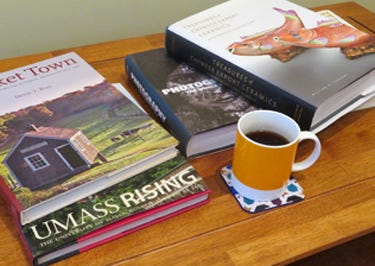
A coffee table book is an excellent example of why you should think hard about your audience before you write it, and especially before you design it. The process can become something of a chicken-and-egg cycle that goes like this:
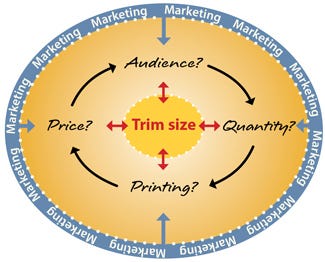
Who is going to read this book? Your answer affects the next one:
How many copies will you need? Your answer affects the next one:
How should it be printed? Your answer affects the next one:
What price should you put on the book? Your answer affects the first one.
What trim size can you use for your book? The answer to this very basic design question is completely dependent on all of the above.
And guess what—every one of these issues is directly affected by your marketing scheme! While this is true of all books, coffee table books require extra planning because they are usually oversized and could require offset printing—which means greater up-front production costs than with print-on-demand (POD), and more books to store and ship. (When I worked as a freelance designer for big publishers, little did I appreciate all the effort that had gone into the decision about trim size!)
Let’s try to sort this all out with a few examples before we start the book design.
How audience and marketing affect coffee table book trim size
Trim sizes galore!
Will you sell your book in museum bookstores? To a massive group of university alumni, members of a trade group, or a similarly large audience? If so, you have a wide choice of trim sizes to work with; in fact, you can devise your own custom trim size because you’ll print sufficient quantities that you can use a commercial offset printing house. Recently I saw some impressive, gorgeous coffee table books that were about 14 × 18 inches, weighing at least 4 pounds each. Think big!
Unless you have deep pockets to pay for the expensive printing and shipping up front, start your marketing efforts now. For help on this score, look for guidance, starting with The Book Designer, Build Book Buzz, The Publicity Hound, and the Association of Publishers for Special Sales.
Limited trim sizes
On the other hand, if you’re making your book to show mostly to friends and family, you should go with POD printing. The largest trim size available through POD printing is 8.5 × 11 inches. Or you might consider using a photo book service such as Shutterfly or Snapfish. With a photo book you can work with up to 12 × 12 inches or 14 inches wide × 11 inches high. Photo services offer pre-designed page layout templates, but you can still produce a striking book.
You can understand from this, I hope, how your audience and your marketing are going to influence the very important question of trim size. I’m going to let you figure out the best solution for your coffee table book. When you’re ready, let’s start designing.
Coffee table book design
If you’ve decided that POD publishing is your best route, you can still create the feel and look of a larger book by following the design suggestions below.
Margins
White space! Coffee table books need lots of it, in the form of generous margins, space around images, and space between lines of type (leading).
Large, heavy books are sometimes a bit unwieldy, but a good offset printer will use a lay-flat binding that will prevent the book from slamming shut. In any case, plan a wide inside margin, at least 1 inch. The top and bottom margins should be an inch or so also. Allow at least 3/4″ for the outside margin.
As with any design element, I recommend looking at other similar books before starting out. I have often measured margins of books that I admire, and you should, too. I’ve also measured type sizes, leading, white space between columns, and even paragraph indents.
Columns and a grid
Coffee table books usually have lots of images that vary in size from very small to full spreads that bleed on all sides. Here are examples from four different books:
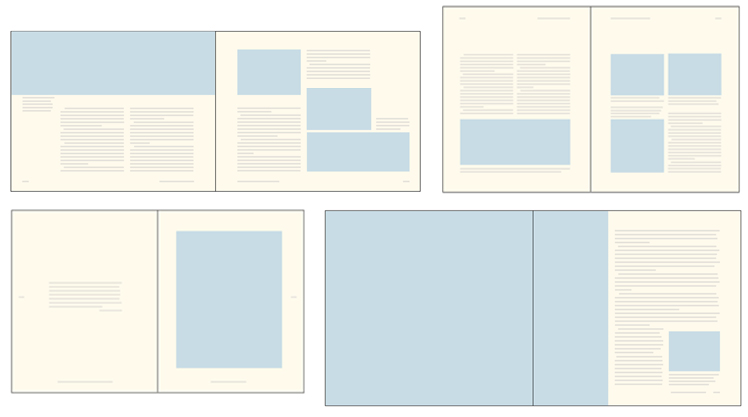
Which one of these will your book resemble? Probably a combination, right? So in order to keep it all consistent, you really need to set up a grid. Your first decision is about columns.
Readers’ eyes skim text left to right, then move down to the next line. To avoid problems in finding the next line, for most books you should design columns that are no greater than 5 inches. But with coffee table books, you will use more leading (space between the lines) than you would in a novel, so you can stretch a line of type to 6 inches without causing the reader any trouble. (See the section below about text size and leading.)
Study the examples above again and you’ll notice that the pages with more text have more columns. Sounds logical, right? It’s also probably the case that some of your pages will have large images, some small, and some will have a lot of text and some very little. So the more flexible you make your page grid, the more layout options you’ll have for each individual spread.
You can find more specifics in our article called Using a layout grid in book design, where we show lots of examples plus why and how to use them. And read “Grids and guidelines” below.
Text size and leading
At the moment there’s a trend toward smaller type with greater leading in display books; I’m sure you’ve seen it, and I do agree that it looks elegant. But is it readable? Keep in mind that for the most part, your readers are going to be older—because what young person will have time to spend thoroughly reading your book? (I’m just trying to be realistic, and of course I could be very wrong about your book.) So please make the type large enough to be read while balancing it with enough white space between the lines. The longer the line of type, the more leading you need.
I’ve seen coffee table books with 8 point type on 13 points leading (which we call “8 on 13”)—the ratio of type to white space is good, but the type is way too small. In general, I’d say you should use at least 11 on 16 for a wide column. And keep in mind that not all typefaces are created equal. Here are some examples of typefaces that are all shown at the same point size:

Please make your type readable. Enough said.
Grids and guidelines
Text leading is the foundation for your book’s baseline grid. (See chapter 23 of Book Design Made Simple for how to set up a baseline grid in InDesign, or read our excerpt on baseline grids). You’ll use the baseline grid as the basis of a workable layout grid, which will help you design and lay out all the different kinds of pages in your book. Once again I’ll refer you to our more detailed article on this topic: Using a layout grid in book design.
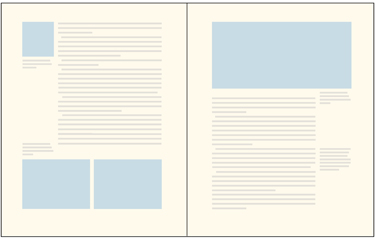
Remember that not all your columns need to be the same width. However, if you want a wider text column plus a narrower one on the outside, you’d be smart to devise a page that is perhaps 4 columns wide and then use three of them, all combined into one text block, for your text, and the fourth one as your narrow column. (See the image to the right.)
Coffee table book colors
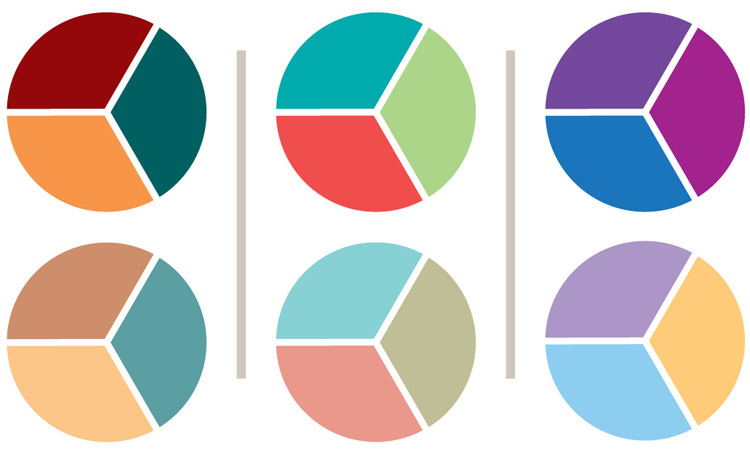
An effective color scheme will keep your book both unified and organized. You’ll probably use certain colors to indicate headings, sidebars, and sections of the book. Though readers might not consciously notice how you’re using your color scheme, they will nevertheless be led by it. You can use our previous blog post on devising a color palette to help you select appropriate colors.
In general, try limiting your colors to a few strong ones and some related (or not) lighter ones, such as the pairs below. The colors you settle on should reflect the mood, culture or geographical area, predominant color of images, or theme of your book. Choose wisely.
Page layout
Coffee table books are meant to be admired more than read. So make each 2-page spread as attractive as possible: colorful, balanced, and dramatic.
Color. Plan your pages so that you have some color on each spread. Even one small image on an otherwise text-heavy spread keeps the eye moving.
You can add color in other ways, too: in headings, page numbers, and running heads or feet, or maybe with a tab that bleeds at the outside edge.
Believe it or not, you can print your book in black and white but still use color in your layout. “Color” in this case means that which is not solid text: white and gray areas in an image, white space—anything that attracts attention and keeps the reader engaged.
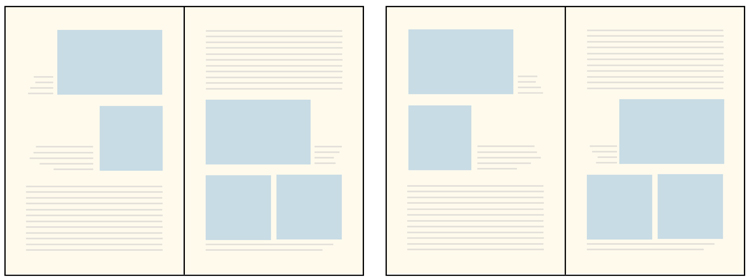
Balance and drama. Aim for variety on each 2-page spread. That means using both large and small images, and balancing each spread carefully. When possible, avoid pages with text only, and limit small type to captions. Keep in mind that the reader’s eye will travel from top left to bottom right. Placing images in those two corners will usually create a dynamic layout, but don’t repeat the same layout too often. Also leave your white space around the edges of the page, not in the middle (see the spreads below). The layout examples in “Columns and a grid” above also demonstrate what I mean.
Coffee table book cover design
Before you start designing the cover, you must decide on a format for it. Do you want a soft cover, maybe with flaps? A hard cover with a dust jacket? Either way, Book Design Made Simple offers 70 pages on book cover and jacket design. You’ll find all the options and technicalities in there.
Coffee table books are large, and they need big, bold covers or jackets. I’m not going to show any examples. Instead, I want you to find the best image from your project and use it as big as you can on the front (and perhaps wrap it around to the back, too). It’s fine if the image already appears inside the book. Look for these main qualities:
representative subject matter that relates logically to the book title
attractive colors
Working with such an image should be fun and inspiring. Now be sure to use large type, and try to incorporate at least one typeface from the interior design and at least one of your palette colors somewhere on the front, back, or spine.
Designing and laying out a coffee table book should be a stimulating experience. It will boost your design confidence, and the result should be pretty darned spectacular. Have fun!