

Working With a Book Illustrator
This is an archived post from Book Design Made Simple.

In October 2026, the website BookDesignMadeSimple.com (founded by Fiona Raven and Glenna Collett) will be closing, and their co-written book will no longer be available for purchase.
While this is incredibly bittersweet news, Fiona and Glenna have generously allowed me to archive their blog posts on Hadley House to avoid having them disappear with their website. You can find all of their archived posts here.
Fiona and Glenna have made a huge impact on my life, teaching me so much about book design and giving me the hope, motivation, and confidence to succeed in this field. I am eternally grateful. It is an honor to learn from them. I think you will feel the same <3
Originally Published: June 11, 2018
By: Fiona Raven
Will you work with a book illustrator for your book cover and/or pages? If so, you probably have lots of questions! Where can you find a suitable book illustrator? How much should you expect one or more illustrations to cost? Will you own the copyright of the illustrations used in your book? What size, resolution, and format should the digital files be?
Here are answers to all those questions and more.
Finding the right book illustrator
You’ll be searching for a book illustrator who has the style and “look” you want for your book at a price that’s within your budget. It’s important that the artist’s illustrations are already in the style you want, as it’s almost impossible to have an artist create something that’s outside their style. For example, don’t hire a cartoonist to do an oil painting for your book cover, or hire a children’s book illustrator to create technical drawings. When choosing an illustrator, make sure that you already love their work and that their style will perfectly suit the subject of your book.
Where to search for a book illustrator
Here are some ideas for starting your search:
word of mouth—do you know anyone who can recommend a book illustrator to you?
ask for recommendations on self-publishing forums
do you belong to any publishing groups that can recommend someone?
if you admire the illustrations in a particular book, find the artist’s name in the credits and contact them via their blog or website
search for #illustrator on social media
search for “book illustrators” online to find illustrator websites or blogs displaying artwork portfolios
The following websites display portfolios of many illustrators’ work. You can search by subject, art style, art medium, location, and so on.
And, finally, there are lots of websites where you can post your project for free, and each site will usually provide you with dozens of bids. Here are just a few of those types of websites you can check out:
Book illustrator costs and copyrights
How much should you expect to pay?
Generally I have paid between $500 and $3000 for a front cover illustration, depending on the complexity of the image and the experience of the artist. Illustrations for pages can range anywhere from $35 to $350 each. Small cartoons to cheer up the pages will, of course, cost less per illustration than full-page color illustrations.
For a standard 32-page children’s picture book, expect to pay $5,000 and up. You may find a less expensive (and therefore less experienced) illustrator, but remember that hiring an experienced illustrator will save you time, money, and grief. Experienced children’s book illustrators can charge up to $20,000 for a color picture book and its cover. A 32-page picture book will probably include 20 full-color illustrations (assuming that most are 2-page spreads), and include the book cover. If you pay, say, $5,000, your book illustrator is getting paid $250 per illustration. That’s not a huge amount, considering how many hours it often takes to create a custom illustration.
Who will own the copyright of the illustrations?
The artists I’ve worked with have a policy that you will own the artwork but the artist retains the copyright. That means that the artist will provide you with the artwork to use for your book and all book-related materials (press kit, marketing materials, bookmarks, author website, etc.). You will also have exclusive use of the artwork for your book, and the artist will not sell it to anyone else or use it for any other purpose.
The artist will, however, retain copyright of the artwork. This means that the artist has the right to show the artwork to prospective clients as an example of their work, and include the artwork in their portfolio.
Getting the details in writing
Make sure it’s clear from the beginning as to what you can use the artwork for, how much it’ll cost, what the timeline is, and whether or not you have the exclusive use of it.
If you want to be able to sell the artwork to someone else later on, or use it for any purpose besides your book that you stand to profit from (such as printing the artwork on t-shirts or other items that you’ll be selling), you’ll need to get permission from the artist to do so. Expect to pay extra for that and, again, get permission in writing.
Make sure to include a clause in your contract stipulating that you’ll receive the illustrations as digital files in the appropriate size, resolution, and format to use for printing. Otherwise, you may find yourself paying a professional to scan or photograph the artwork at your expense.
See an example of a basic contract between a self-publisher and an artist here.
Gaining permission to use existing artwork
Suppose you find an existing image you want to use for your book. It could be a work of art in a museum, from a website or magazine, or any artwork that has already been created. You’ll need to request permission to use the artwork, find out the cost, and obtain a suitable digital file. Here is a sample permissions letter you can use.
Note: Be aware that if you use museum artwork, you will most certainly be required to use the entire piece without cropping.
Working with your book illustrator
Your illustrator will get started once your contract is in place and a deposit is paid. For some books, the illustrator will need to see the layout of the text on the pages. This helps them to 1) read the text for context, 2) see how much space is available for each illustration, and 3) plan the illustration to fit the surrounding text.
First you’ll see some roughs (pencil or digital sketches) to make sure the illustrations are on track. Once approved, the artist will finalize the illustrations and add color. Final payment is due upon final approval of the illustration.
Clear communication with your illustrator is key. To make things go as smoothly as possible, don’t assume that the artist knows what you’re thinking. Tell them, for instance, that you want the house to be Victorian style, or you want the little girl to look hopeful no matter what happens to her, or that the people in the illustrations are African American.
Once you receive the roughs, go through them thoroughly, taking your time. Make sure they fit the space you’ve allotted for them. If they’re not what you envisioned, let them sit for a couple of days. You might discover that the illustrator has captured something that’s actually better than what you expected.
The artist will expect you to request some changes and will (or should, at least) appreciate any helpful suggestions. They do want the illustrations to be perfect for your book—after all, you could possibly work as a team again in the future, or you might refer another author to them someday.
Calculating the right size for illustrations
You’ll want to be sure that the illustrations you’re commissioning are the right size for your printed book. These dimensions should be included in the contract you sign with your book illustrator. If your illustrator knows these specs right from the beginning, you’ll avoid any difficulties during the book production stage.
Size of full-bleed illustrations
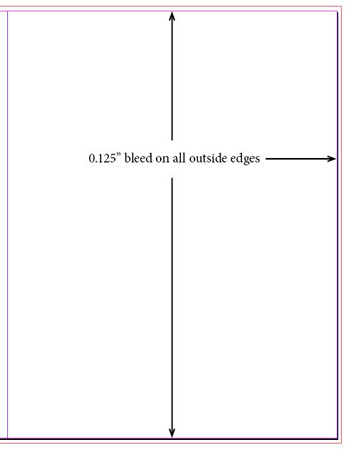
Full-bleed illustrations extend beyond the edges of the pages so there are no white areas showing when the printed pages are trimmed to size. Let’s say the trim size of your book will be 8.5″ × 11″. Your printer will require a minimum bleed of 1/8″ (0.125″) on all the outside edges of your pages.
A 1-page illustration will have an extra 0.125″ added to the top, bottom, and outside of the page, like this:
A 2-page illustration will have an extra 0.125″ added to the top, bottom, and outside of both pages, like this:
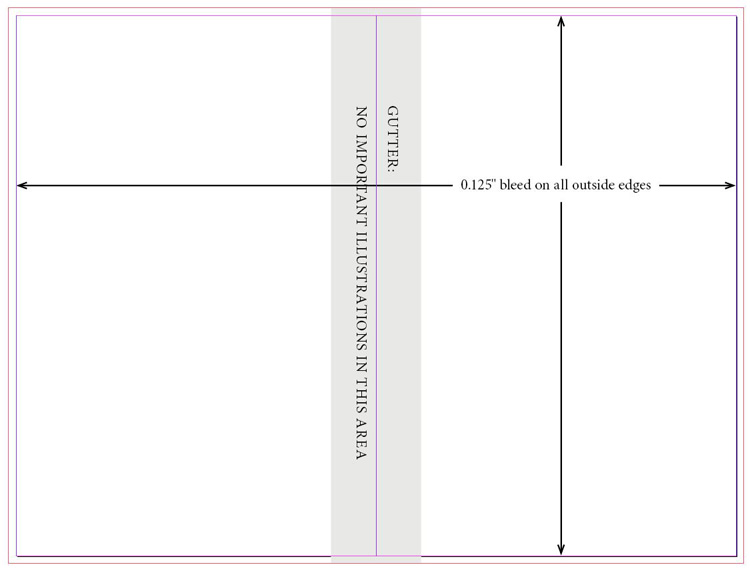
Note: The center of a 2-page spread is bound into the gutter (or spine) of the book. For that reason, it’s crucial that no important parts of an illustration are placed down the gutter, as they will disappear into the binding of the book. Usually the gutter is an area approximately 1.5″ wide down the spine (see diagram above).
For children’s book illustrations, it’s often helpful for your book illustrator to see the layout of the text on the pages before creating the illustrations. That way, they can leave enough space in the illustrations for the text. The text will ideally be placed over an area of the illustration that isn’t busy and is a light enough color so that the text is easy to read (such as a pale area of sky).
Similarly for your front and/or back cover, any bleed illustrations will have to extend beyond the edges by the same amounts: 0.125″ at top, bottom, and sides. Your book printer will specify the bleed amounts on your cover template. (If you are designing the cover yourself, see part 8 of Book Design Made Simple for all the details on this.)
Size of spot illustrations
Spot illustrations don’t bleed off the edges of the pages, but are contained within the page margins and occupy a quarter, half, or full page. Let’s say, for example, that your page size is 6″ × 9″. Usually the margins for a book this size are approximately 0.75″ on all sides.
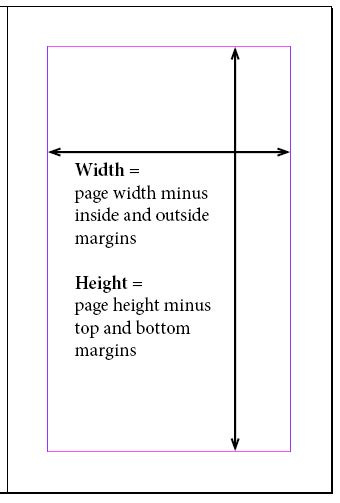
Your illustrator can then create illustrations to integrate nicely with the text, such as for chapter openings or call-outs.
Image resolution and file formats
There are two kinds of digital files for images:
Scans and photographs (images based on pixels)
Drawings (images based on lines, paths, and curves)
The resolution and file format requirements for these two file types are different. Here’s what you need to know.
For scans and photographs
Scanned artwork and photos need to be at least 300 pixels per inch (ppi) at the actual size that they’ll be printed. Check here to see if your images are high enough resolution for printing.
Scans and photos are usually saved in JPG format with RGB color space. (RGB is the color mode used by digital cameras, scanners, computer monitors, and ebooks, but is not used in printed books unless your printer specifically states that it’s okay. At the time of writing, Kindle Direct Publishing will accept RGB files.)
If your printer requires CMYK color (the 4 colors of printing ink: cyan, magenta, yellow, and black) or grayscale (black ink only), then your image files will need to be converted from RGB to CMYK or grayscale. The images will then be saved in an Adobe Photoshop format such as PSD or TIF.
In summary:
if RGB is acceptable — 300 ppi, RGB, JPG format
if CMYK is required — 300 ppi, CMYK, PSD or TIF format
for grayscale — 300 ppi, grayscale, PSD or TIF format
Instructions for this entire process can be found in chapter 46 of Book Design Made Simple.
For vector drawings
Vector drawings are created on the computer in a draw program such as Adobe Illustrator. Shapes are described with mathematical expressions called vectors. A vector drawing can be printed at any size without loss of quality, and therefore resolution is not an issue.
Anything drawn in Adobe Illustrator is a vector drawing, and will be saved in the AI format.
Ready to get started?
Working with a book illustrator can be frustrating, or it can be rewarding. If you find the artist most suited to your project, pay fairly, communicate clearly, and know what to expect throughout, you’ll glide smoothly through the process. We wish you the best possible results.