

Your Copyright Page: Everything You Need to Know
This is an archived post from Book Design Made Simple.

In October 2026, the website BookDesignMadeSimple.com (founded by Fiona Raven and Glenna Collett) will be closing, and their co-written book will no longer be available for purchase.
While this is incredibly bittersweet news, Fiona and Glenna have generously allowed me to archive their blog posts on Hadley House to avoid having them disappear with their website. You can find all of their archived posts here.
Fiona and Glenna have made a huge impact on my life, teaching me so much about book design and giving me the hope, motivation, and confidence to succeed in this field. I am eternally grateful. It is an honor to learn from them. I think you will feel the same <3
Originally Published: March 8, 2018
By: Glenna Collett
Some people say that the first page is the most important one in any book—and that is probably true as a means for hooking a reader. Others say that the cover is the most important. But I contend that the copyright page wins the prize because it’s probably the first page that a librarian, bookseller, or distributor looks at. And that makes it an integral part of your book marketing program.
Many self-publishing authors find the copyright page to be horribly confusing. All that legal language! All those numbers! What does it all mean?
Copyright page template in Word
To help you get it just right, I’m including a Word copyright page template for you to copy and paste into your book. After you download it, continue reading below where I explain every part of the copyright page, with the caveat that I am not offering legal advice. And the information is mostly for U.S. and Canadian publishers.
Click here to download the Word template.
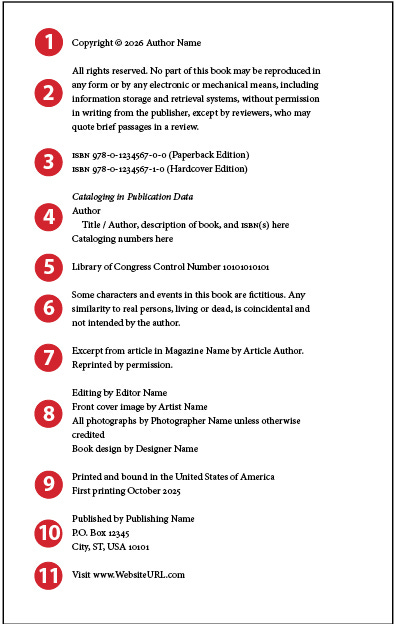
Below is the sample copyright page that we show on page 226 of Book Design Made Simple. I’ve numbered the sections and will discuss each below. Ready?
Parts of the copyright page explained
1. Copyright notice

Let’s talk about the copyright owner first. That is probably you, the author. Even if you have formed a publishing company (see item 9 below), in 95% of cases, the author is still the owner. If you’re using a self-publishing service (e.g., BookBaby, Lulu, XLibris) as your publisher, they usually want you to own the copyright.
Now, the copyright date is a bit more complicated, especially in the United States. Your goal is to make the date stay current for as long as possible, and you are supposed to use the year in which you obtained your official copyright. So there is a trick you can use here, and that is to publish the book in the last 3 months of the year and use next year’s date. You can do that because the U.S. Library of Congress allows you 3 months from the time of printing to apply for your official copyright. So put 2026 on your copyright page, publish in 2025, and apply for your copyright in 2026.
If your book is in a later edition, list all the copyright years of the various editions, beginning with the current one, like this:
Copyright © 2026, 2022, 2018 Author Name
Please do not run out and get an official copyright the minute you finish your manuscript! Three reasons for this: (1) Your words will probably be edited and could change drastically. (2) If you keep the words on your computer and don’t distribute or share them, who is going to steal them? (3) It might take you a long time to actually produce the book, and by then the copyright date you rushed out to get will already be old. If you are really, really worried about early infringement, you can preregister with the U.S. Copyright Office—you’ll find details on the U.S. Copyright Office’s Preregistration FAQs page.
How to get a U.S. copyright. The U.S. Copyright Office is a division of the Library of Congress. Go to copyright.gov, read the FAQs page, and then register online. You pay $45 for a single work by one author.
Why bother to get an official U.S. copyright? Even though all works are automatically eligible for copyright, if someone steals your words, you will have no legal protection without an official registration—meaning you can’t win an infringement suit.
What about the famous “poor man’s copyright”? Though we do explain the procedure for that in Book Design Made Simple, we don’t encourage anyone to use it. It’s complicated, requires careful storage of two hard copies of your manuscript, and saves only part of the $45 you’d be paying the government.
How to get a Canadian copyright. Copyrights in Canada are no longer free, alas. The Canadian Intellectual Property Office has various charges for obtaining a copyright, starting at CAD $63. You’ll need to check their website for details.
How long does the copyright last? In both countries it protects your work for your lifetime plus 70 years. If you come out with additional editions, you really should reapply for an official copyright each time. The new copyrights protect only the new material, while the original still stands.
Note: Get the copyright notice from the country where you live. The location of your printer is irrelevant. It also doesn’t matter where you plan to sell the book.
2. Reservation of rights
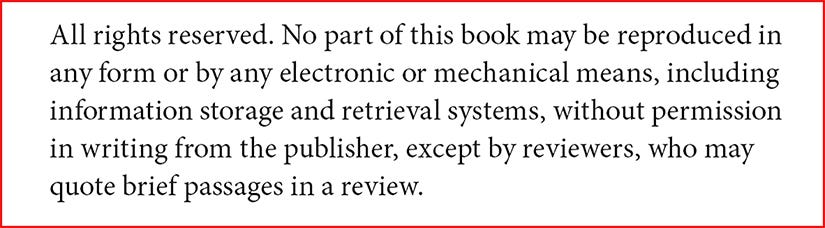
Where do people get this copy from? Do they hire a lawyer? Well, no. In my experience, everyone simply uses the generic paragraph shown above or something similar, sometimes adding specific wording about how to obtain permissions, or deleting the phrase about reviewers. Think about this and then be specific about what others may and may not do with your words; in an infringement case, you’d have little to stand on without it.
3. ISBN

Of course you already know that ISBN stands for International Standard Book Number and that each part of the number has a meaning. You can read the details on page 447 of Book Design Made Simple, or read ISBNs for Self Publishers. If you plan to sell your book in stores or online, you must have a number. And each different edition of your book needs a separate number: paperback, hardcover, audio book, and ebook.
In the example above we show only two ISBNs. If you have other editions, simply put all the numbers in a list. Don’t worry if you’ve already printed 1,000 copies of your book and then you decide to do an ebook. The list will get longer with each subsequent edition.
How to get a U.S. ISBN. A private company called Bowker is the official ISBN provider in the United States. Go to their website (Bowker.com) and purchase 1, 10, or more. Assign them to your books as you produce them via your online ISBN account. It’s best to use them in sequential order (using the number before the final hyphen, as shown above), just to keep things simple and logical. Keep careful records.
How to get a Canadian ISBN. ISBNs are free to Canadian publishers. Go to the Library and Archives Canada ISBN page to get yours.
Note: As with your copyright, get the ISBN from the country where you live. The country of your printer and the places where you plan to sell the book are irrelevant.
What about ISBNs provided by publishing services? Most of these services will give you an ISBN at no extra charge. Should you go for this great deal? We say no. That’s because the third section of the number identifies the publisher, and the publisher in this case is your service company. Librarians, bookstore owners, and distributors have come to recognize the numbers for BookBaby and the rest, and many will reject a book outright if they see one of those numbers. Before you sign on the dotted line with these folks, find out if they require you to use the ISBN that they provide.
This is one main reason that we advise you to use these companies as your PRINTER if you must, but not as your PUBLISHER. In other words, feel free to use their POD printing, but don’t use their publishing services.
4. Cataloging in Publication data
If you publish 5 or more books a year, the Library of Congress will provide Cataloging in Publication (CIP) data for U.S.-published books. If you publish fewer, you might wonder why you need this data block at all. Basically, CIP data on your copyright page will get your book onto library shelves more quickly. See our blog post on CIP data for more details and for links to private CIP data providers.
In Canada, the Library and Archives Canada provides free CIP data for certain publishers and publications. Check your eligibility here.
At this moment, we know of no CIP data providers who deal with books that are self-published in Canada.
5. Library of Congress and Library and Archives Canada data

In the United States, you should get a Library of Congress Control Number (LCCN). It is free, and it shows book people (remember those librarians and booksellers?) that you know what you are doing, plus it makes their jobs easier. In fact, many libraries will not accept books without an LCCN. Simply apply for the number online (http://www.loc.gov/publish/pcn/).
The Library of Congress does not provide cataloging-in-publication (CIP) data to any publisher producing fewer than a dozen titles a year. You can, however, hire a private cataloger to give you CIP data if you like. If you sell to libraries, you will see your book appear on the shelves days, weeks, or even months sooner if it has the CIP data. (Some CIP providers: CIPBlock and Lisa K. Hauner, a Spanish cataloger in the Oregon library system who is happy to assist with bilingual CIP data.)
CIP data, if you’ve been wondering, looks like a mini library catalog card. It lists the title, author(s), their date(s) of birth (and death), book subject categories, and several mysterious-looking numbers that librarians understand.
In Canada, CIP data is no longer provided to self-publishers. Instead, when you submit the required two copies of your self-published book to Legal Deposit in the National Library of Canada, your book will be cataloged there by Library and Archives Canada.
6. Disclaimer

In your fiction book, you may have unwittingly portrayed someone you never met, or maybe your next door neighbor. Who knows? So it might make sense to put a statement like this on your copyright page, or on a separate page in the front matter, to protect you from potential lawsuits.
7. Permissions notices

Please always give credit for anything you borrowed from another work. And back up your credit with actual written permission from the copyright holder. Permissions is an enormous topic—big publishing houses have entire permissions departments—and we are not experts. Just get permission in writing (save all correspondence) and say “reprinted by permission” on the copyright page. If you take words from a work that is in the public domain, give credit for that, too. You’d appreciate it, after all, if someone did the same for you, even if you were long dead. Right?
Remember to give credit to your photographers and artists, too.
If you have a huge number of credits, make a Credits page in your back matter and list them all there. But on the copyright page, put a statement saying something like “Credits and permissions are listed on page ___ and are considered a continuation of the copyright page.”
Warning: Do not wait until the last minute to obtain permissions! Sometimes it takes many months to track down a copyright owner and then come to an agreement with them. Always have a Plan B in mind in case permission is denied or you cannot locate the owner—and thus may not use their words or artwork.
8. Credits
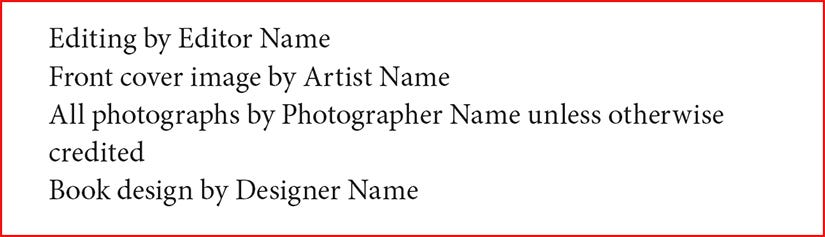
This list of credits for those you paid to produce your book is partly optional. Always list your cover designer and the person who made the image for the front cover (or put them on your back cover or dust jacket). Your other team members may or may not want to be listed, so ask them before putting their names on the page. Aside from the ones shown above, you might also include your proofreader, indexer, and printer.
Your Acknowledgments page is the place to mention your friends, family, peers, colleagues, reviewers, writing coaches, advisors, and anyone else who helped and encouraged you. If you want to point out a paid team member’s extraordinary assistance, you may mention them in your Acknowledgments as well as on the copyright page.
9. Country and printing number

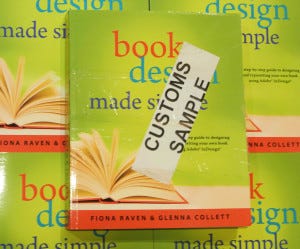
Have you ever wondered why this statement is shown in every book? It’s for the customs people who lurk at every international border. When a book, or especially a shipment of books, crosses a border or enters a port, an official is supposed to check where the book was printed. The first printing of Book Design Made Simple was done by Friesens in Canada, and then most of the copies were shipped to the United States. At right is the book that was on top of the pallet that arrived at my house in the U.S.
As to the printing number (“First printing”), you simply include that for your own information. If you see your book at a yard sale (heaven forbid!) in twenty years, you’ll look inside right away and see what printing it was and infer when it was originally purchased. Other users might want to see how many printings the book has been through, too; a best seller could go through a dozen printings in a short period of time, and that’s an interesting tidbit. And if the book ever becomes a collector’s item, the printing number will affect its value.
Some big publishers use a string of nonsensical-looking numbers to indicate the printing number and also the year—something like this:
1 2 3 4 5 28 27 26 25
The far left number indicates first printing, and the far right number indicates 2025. As the printings go up, the outside number(s) are deleted, so that the third printing, if it happens in 2026, would show “3” on the left edge and “26” on the right edge. In the olden days (before desktop publishing), it was easy for the prepress person to physically delete the outer numbers without requiring any new typesetting. This scheme is interesting but too complicated for your purposes. Just stick with “First printing, 2025” and add the month if you like.
If you are using only POD printing, don’t bother with the printing number at all.
Note: “First printing” refers only to the printing process and is not related to “First edition.” The reader should assume that pretty much every word in the second printing is the same as in the first printing.
10. Publisher name

Perhaps you are using BookBaby or another publishing service as your publisher (not simply your printer). If so, there’s no need to come up with a publisher name. You might want to reread the first paragraph of section 3 above before you decide this issue.
If you are on your own, consider forming a publishing company (it can be just you), registering it at your town or city hall, and putting the name on the title page, copyright page, and back cover. (Do a thorough search to make sure you are not using someone else’s business name!)
Show some kind of address here. In the future, if someone wants to ask permission to use your words, you want to be easy to find. The contact information can be your email address, your street address, or both. Or use a P.O. box number to protect your exact location.
11. Your web address

Simply add your web page’s URL here as another way for folks to find you, read your author bio and reviews, discover how great you are, and follow your progress.
Start your copyright page now
We hope this blog post has helped clear up most questions about your copyright page. For quirky situations, refer to other books to see how they are handled there. If there is a serious problem, consult a copyright lawyer.
Remember to download and fill in our Word template and start assembling the data for this vitally important page right away; you’ll be so glad you got an early start.