

Designing a Book Spine
This is an archived post from Book Design Made Simple.

In October 2026, the website BookDesignMadeSimple.com (founded by Fiona Raven and Glenna Collett) will be closing, and their co-written book will no longer be available for purchase.
While this is incredibly bittersweet news, Fiona and Glenna have generously allowed me to archive their blog posts on Hadley House to avoid having them disappear with their website. You can find all of their archived posts here.
Fiona and Glenna have made a huge impact on my life, teaching me so much about book design and giving me the hope, motivation, and confidence to succeed in this field. I am eternally grateful. It is an honor to learn from them. I think you will feel the same <3
Originally Published: March 7, 2022
By: Glenna Collett
Front covers attract and back covers sell—we’ve said it before. At the same time, a book spine should broadcast.

Most books in stores and libraries are shelved with their spines facing out. If a book has a great title and a well-designed spine, it’ll attract a lot more eyes than its neighbor on the shelf. So here’s how to accomplish that for your book.
What to include on the book spine
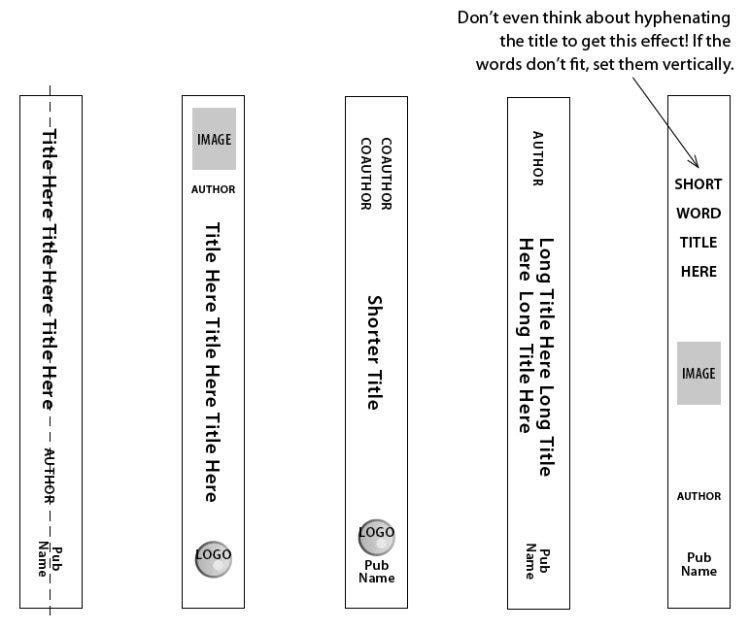
The book spine should display the most important information at a glance: author’s last name, title, and publisher or colophon (logo). Normally you don’t include the author’s first name or the book subtitle, though there are always exceptions. Too many words dull the impact.
When the book lies face up on a surface, the spine copy should be right side up. This means that you should arrange the type so it flows down the spine. (In some European countries, it’s done the opposite way, though.)
A spine that’s thinner than 1/4″ cannot hold type because there’s usually a 1/8″ safety area to the left and right of the type. This safety area exists in case your spine slides over to the front or back a bit during binding. How do you know how wide your spine will be? Ask your printer. Most printers will send you a cover or jacket design template to your exact measurements. If not, consult chapter 62 of Book Design Made Simple for guidelines.
A good title
Coming up with a great book title is very important, and it takes some imagination and marketing savvy. We know a good title when we see one, but we’re not experts, so we’ll offer you some helpful articles:
How to Write the Perfect Book Title [Ultimate Guide] from Scribe Media
How to Create Good Book Titles from Bookfox
How to Craft Effective Book Titles (& Subtitles) from Friesenpress
Background color or image
You can design a book spine for a paperback or a dust jacket in two basic ways. Either use it as a space for the front cover to flow over to the back, or make it a distinct piece that divides the front and back designs. Since the main idea is to make the type on the spine as readable as possible, a busy background could completely defeat the purpose. Also, the front and back designs might be different (busy on the front, plain on the back), so the spine is usually the most logical place to make that break.

In the examples above, the images and colors flow from front to back in a logical way that unifies the designs.
Choosing a color or set of colors for the spine background shouldn’t be too difficult. Assuming that your front and back covers are attractive, simply pick up eye-catching ones from there, or maybe find a contrasting color instead.
Because book binding is automated and not every single spine comes out perfectly centered, it can be smart to wrap a bit of color around from the front and back to the spine, or vice versa, as in the examples below. This way, any imperfections are less noticeable.

Design a book spine for impact
Visibility is your main goal. Make the type as large as you can while staying within the designated type area. The type should contrast with the background to boost visibility, too.
The type on a book spine can be arranged in so many ways! Here’s an illustration from Book Design Made Simple (page 440). Notice that the publisher’s name is always at the bottom in these examples. If your book will be appearing in libraries, the catalog number will be shown on a sticker at the base of the spine—so don’t let the title or author’s name stray down too far.
And here are some real life examples.
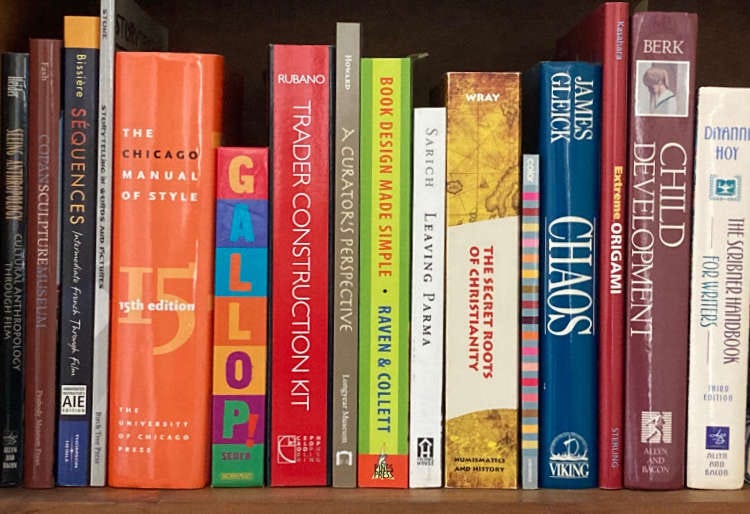
Big. Bold. But still in keeping with the rest of the cover. For the title type, match what you used for the title on the front cover. If you discover that it’s unreadable at a small size, make it bolder or pick a different typeface from somewhere else on the cover.
Designing covers and spines for a book series
Advance planning is the key here. Notice in the books below how the spine elements line up with each other for maximum impact on the shelf. Check out our article on designing a book series in this blog for more advice.

For such a small space, the book spine has enormous possibilities. And enormous potential to help sell your book.
We hope this article will get you started designing the spine for your own book with confidence.